
Using a spreadsheet to track a complex migration project can generate more problems than it solves. Spreadsheets don't adjust for different user roles, they don't audit edits, they don't manage workflows, and they don't provide alerts. Even keeping track of who has the latest version of the spreadsheet can quickly become a nightmare.
PlateSpin® Transformation Manager solves all these problems while preserving the main benefits of a spreadsheet, including streamlined searching and easy mass editing of selected configuration items.
Migration projects don't have to contain tens of thousands of servers before they become complex. Even just a couple hundred servers can result in challenges such as:
With PlateSpin Transformation Manager, you can subdivide your project into any number of smaller, more manageable chunks, and assign the right people to manage them—all without losing sight of the progress of the entire project. As your migration teams work through their tasks, you can track their progress (and missed deadlines) so that you can act rapidly and efficiently when issues need your attention.
For service providers or systems integrators executing migration projects on behalf of their end customers, it's crucial to ensure that all customer data is perfectly segregated. PlateSpin Transformation Manager is built on a true multi-tenant foundation, ensuring 100% separation and confidentiality for end customers and their data.
Furthermore, to reinforce their brand with their customers, service providers and system integrators can replace all logos and colors from the PlateSpin Transformation Manager user interface with their own.
PlateSpin Transformation Manager has been tested with tens of thousands of servers. Even with such high numbers, PlateSpin Transformation Manager makes searching and editing a breeze with a simple and intuitive user interface that feels quick and responsive, even with large projects.
PlateSpin Transformation Manager is delivered as a virtual appliance, eliminating difficult installations, dedicated hardware, and complex configurations. It only takes a few minutes to configure the appliance for your environment before you can start importing source workloads into the system.
Whether you're a project manager, project architect, migration specialist, or dashboard viewer, you can only see and act upon information that's relevant to you. Role-based access for all project members and users increases security and decreases the potential for human error, preventing people from changing or working on the wrong workloads or tasks.
PlateSpin Transformation Manager has been designed to collaborate with PlateSpin Migrate, the leading server migration solution. PlateSpin Migrate configuration settings can be saved and referenced in PlateSpin Transformation Manager, reducing the potential for human error and speeding up execution of actual server migrations. The synergy between the two solutions ensures that you can execute your projects with the highest level of efficiency in the least amount of time.
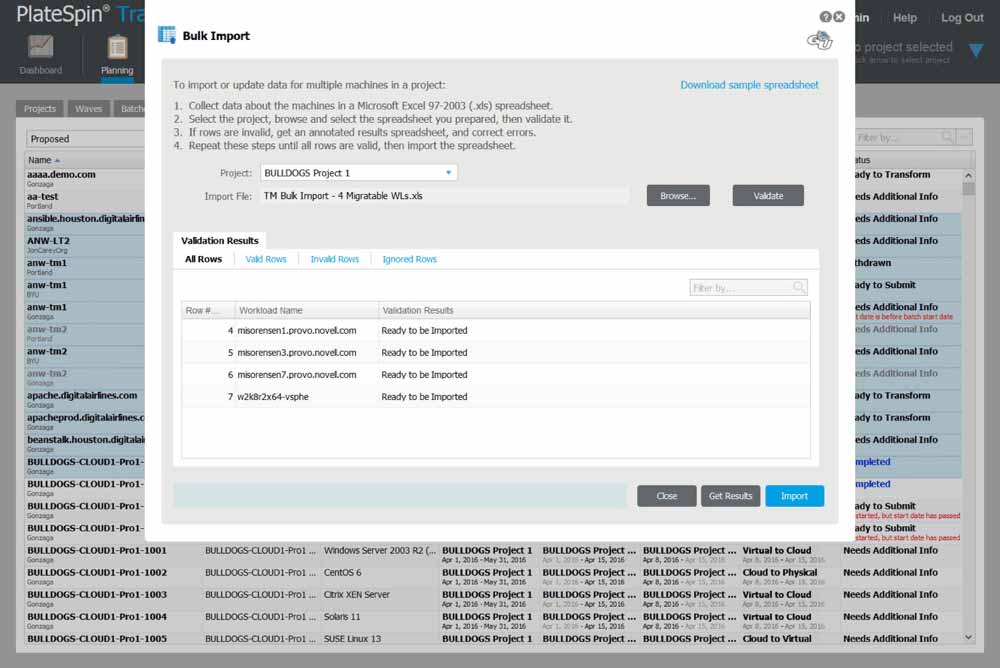
Manual data entry is time-consuming, tedious, and rife with potential for human error. PlateSpin Transformation Manager allows information about source server workloads to be easily imported via spreadsheets (human-generated or exported from third-party products). If you prefer, you can populate the source server workload database with information from your internal systems via a powerful application programming interface (API).
PlateSpin Transformation Manager can easily import information in Microsoft Excel format.
PlateSpin Transformation Manager lets you easily track and manage all your data center migration projects, so you spend more time completing migrations and less time managing your tools.
Whether your project includes physical-to-virtual (P2V) migrations, virtual-to-virtual (V2V) migrations, cloud migrations, "lift and shift," or any other types of server migration, PlateSpin Transformation Manager keeps you on time and on budget.
See exactly how your data center migration projects are progressing, from high-level visualization to granular detail, and share with internal and external stakeholders.
Break away from static single-user spreadsheets and share customized views with team members, executives, and customers—you can even manage multiple concurrent projects for different customers with true multi-tenancy.

Version 1.1 offers new automatic discovery capabilities and enhances data center migration planning for all modes, with extra improvements to the automated mode.

